Last Updated: February 24, 2026
If you are using Xcode with an AI app builder mindset, you have probably felt the whiplash. The agent can draft views, hook up navigation, and even propose sensible architecture in minutes. Then you hit the part that decides whether the app is real or just a pretty demo: auth, persistence, background work, push, and the boring but necessary “what happens when this fails” paths.
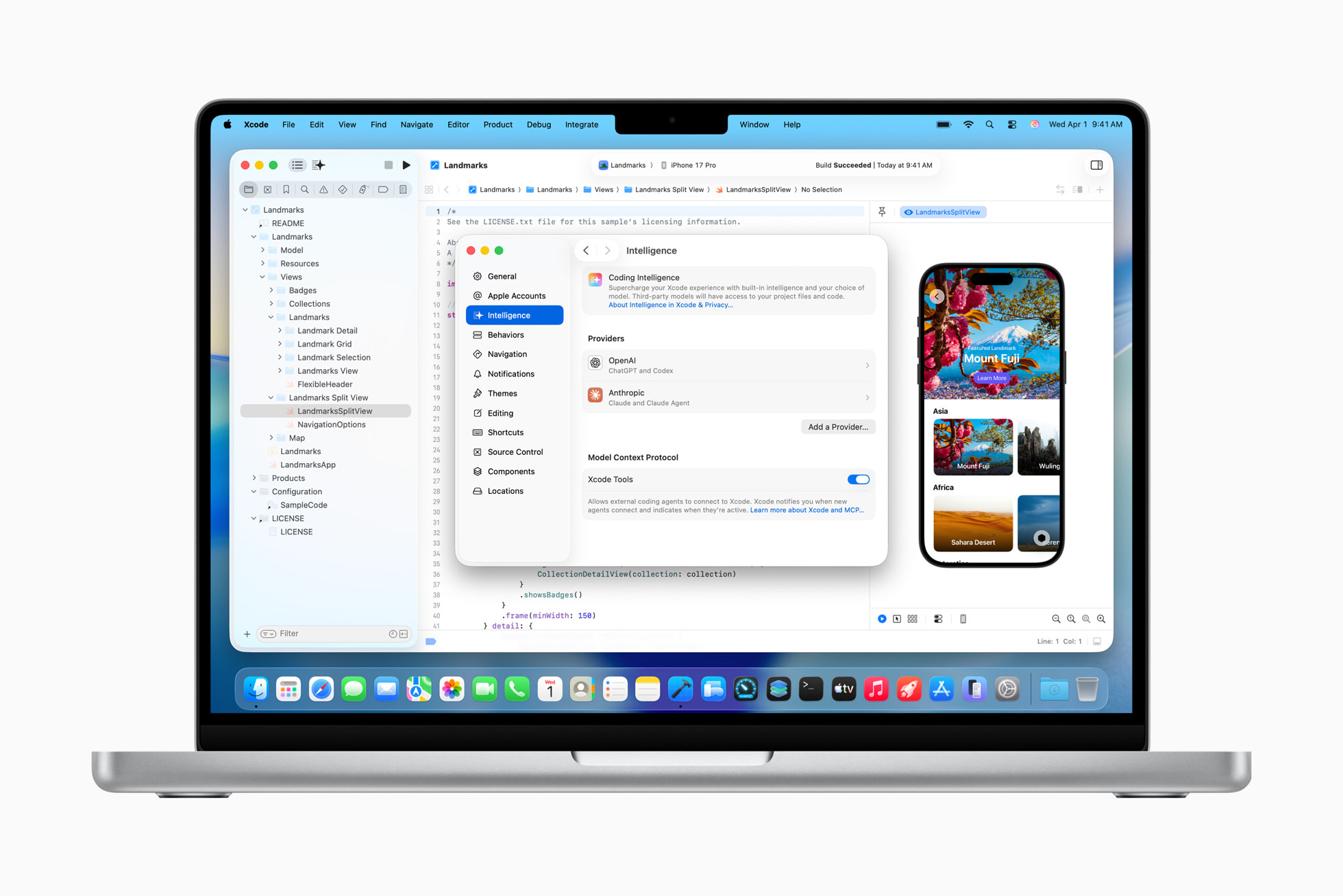
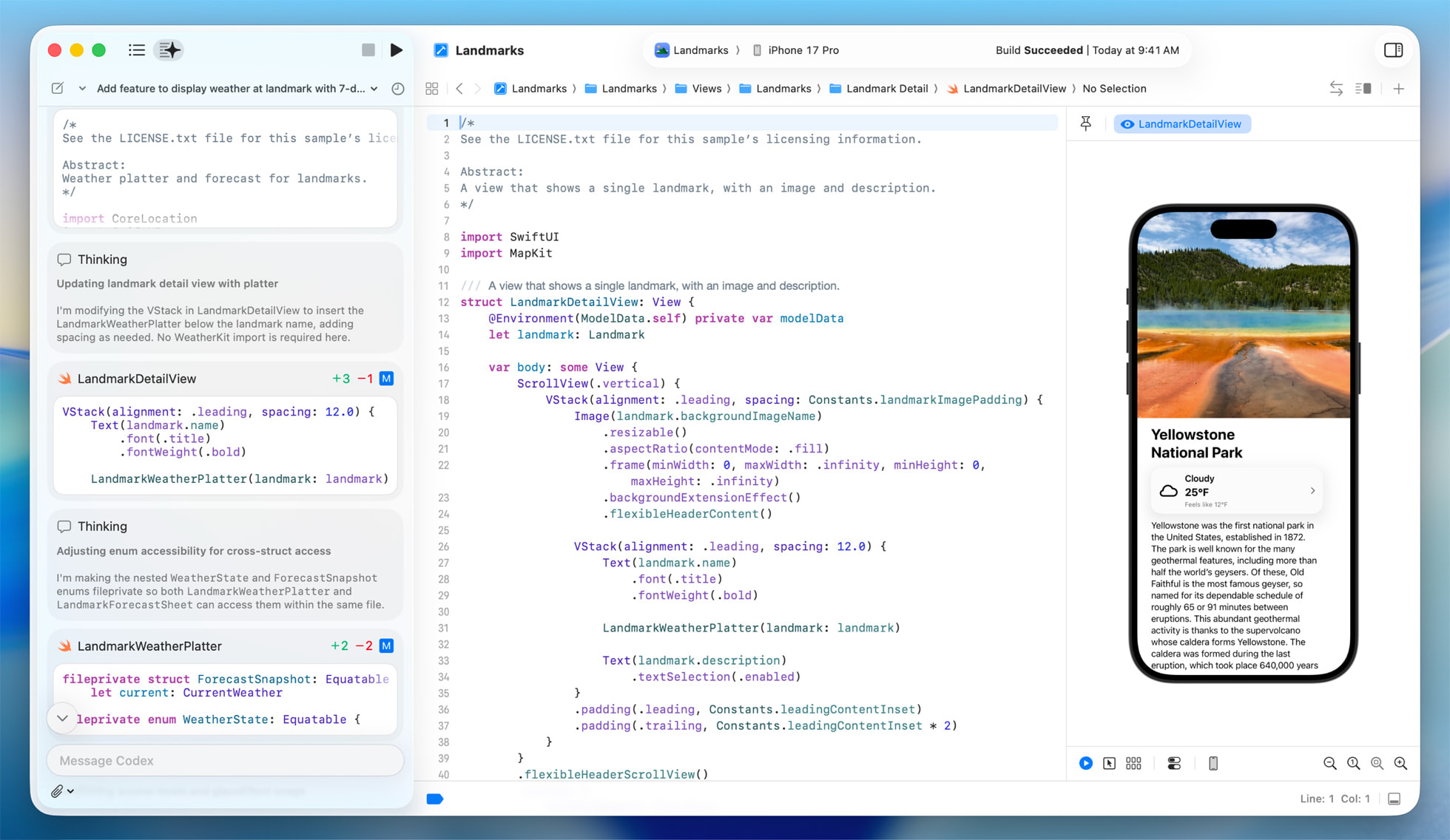
That gap is exactly why IDEs are shifting from chat-style assistants to agentic workflows. Instead of only suggesting snippets, the tool plans a change, makes edits across files, checks the result, and iterates. Apple has been steadily moving Xcode in this direction with its “coding with intelligence” features and assistant experiences like Swift Assist and Apple’s broader push to put intelligence directly into developer tools (see Apple’s developer tools overview in its Newsroom post).
The practical takeaway is not that agents magically ship for you. The takeaway is that the unit of work is changing. You are no longer delegating a function. You are delegating a plan, with checkpoints, reversibility, and explicit boundaries.
This article gives you a situation-driven way to make that shift pay off, especially if you are a solo founder or indie hacker using an AI app generator to crank out UI fast and now need a backend by the weekend.
Source Apple.com
The Real Shift: From Autocomplete to Collaborative Coding
For years, AI in IDEs meant faster typing. Agentic tooling changes what you ask for. Instead of “write a login screen,” you ask for “add sign-in, persist the session, handle token refresh, add a user profile object, and make sure the app still launches offline.” That is collaborative coding, but it only works when the agent has enough context to act safely.
You can see the industry converging on a few ingredients:
First, agents need structured context. That is why protocols like the Model Context Protocol (MCP) exist. They define a standard way for a model to call tools, read project data, and operate within guardrails instead of scraping whatever is on screen.
Second, agents need tool access that matches how developers actually work. Tools like OpenAI Codex and the Anthropic Claude Code SDK are built around task execution and iteration, not just chat.
Third, agents need a safe way to undo. When an agent performs code fixes across files, you need easy rollback and a clear summary of what changed, otherwise every “helpful” change becomes a trust problem.
The pattern is clear: agentic coding is becoming less about novelty and more about operational reliability inside the editor.
AI App Builder Reality Check: What Agents Won’t Ship for You
Agents can write plenty of working code. The problem is that shipping is mostly about constraints, not syntax.
When vibe coding goes wrong, it usually fails in one of these predictable places.
It fails at state. The UI looks done, but nothing persists across app restarts or network drops.
It fails at identity. You can create an app quickly, but the first time you need account linking, password resets, revocation, or social login edge cases, the agent starts guessing.
It fails at costs. You prototyped with generous defaults and suddenly your “make an app for free” weekend becomes a month of cloud bills. This is extra common when you add LLM features and every user action becomes multiple API calls.
It fails at long-running work. Push campaigns, recurring jobs, sync, and data backfills do not belong on the device, and they do not belong in a request thread either.
The general principle is simple: agents are strong at producing code, but weak at owning consequences. You have to provide the boundaries: what must be persisted, what must be auditable, what must be reversible, and what must be rate-limited.
The 10-30 Minute Checklist After the UI Is Done
Source Apple.com
Once the agent has generated the UI, you want a short path to “a real app” that you can share with users or investors. The fastest route is to wire the minimum viable backend contract first, then let the agent iterate safely inside those rails.
Here is the checklist we see work in practice for prototypes, internal tools, and early launches.
1) Define the Backend Contract Before You Add Any Screens
If you let an agent invent data models per screen, you will end up with mismatched fields, duplicate concepts, and fragile migrations.
Start with a single page you can paste into your agent prompt:
- The core collections you need (usually 3-6): users, sessions, a primary domain object (notes, tasks, workouts), and an event/log collection.
- Which fields are client-writable versus server-only.
- What “offline first” means for your app. For example, “show cached data on launch, then sync.”
- The two most important queries. For example, “my items” and “item detail.”
This is not bureaucracy. This is how you turn vibe coding into repeatable work.
2) Add Auth Early, Because It Touches Everything
Auth is the first cross-cutting concern. It decides how you store user-owned data, how you secure endpoints, and how you test.
The reason to do this early is not security theater. It is that most later changes become easier when you can reliably answer “who is this request for?” and “what is this user allowed to do?”
If you want fast iteration, pick an auth setup where sign-up, sign-in, password reset, and social login are not a separate project.
3) Persist State, Then Add “Resume” Paths
Agentic workflows tend to optimize for the happy path. Real apps need resume paths.
You want to persist:
- The user session.
- The last known good data for the home screen.
- Any “in-flight” actions that must retry safely (uploads, queued writes, background sync).
This is where many AI app generator projects stall. The UI is complete, but every app restart wipes the experience.
4) Decide Where Your Agent Ends and Your Backend Begins
A lot of teams accidentally turn their mobile app into the backend because the agent can generate it quickly.
Keep a clean rule: anything that needs secrets, long-running work, fan-out notifications, or rate limiting belongs in server-side code. Your device code should call a backend API, not own the workflow.
This also makes testing easier. You can isolate failures and you can redo work without shipping a new app build.
5) Add Push and Jobs Only After You Can Observe Them
Push and background work are where “it works on my phone” dies.
Before you add push notifications or recurring jobs, make sure you can answer:
- Did the job run?
- How long did it take?
- How many retries happened?
- Which users were targeted?
If you cannot observe it, do not automate it yet.
How To Prompt Agents So Their Work Is Testable and Reversible
Agents are most useful when they can operate like a careful teammate. That means you need to change how you request work.
Ask for a Plan With Checkpoints, Not a Finished Feature
A reliable prompt pattern is:
“Propose a plan in 5-8 steps. After step 2, stop and summarize the changed files. Do not proceed until I confirm.”
This does two things. It reduces the blast radius, and it forces the agent to make its assumptions visible.
Bind the Agent to Invariants
Invariants are rules the agent must never violate. Examples that matter in production:
- “Do not change the auth flow.”
- “Do not modify database schema without listing migrations.”
- “Do not increase network calls on app launch.”
Agents are good at code fixes, but they will happily refactor away your safeguards if you do not tell them what matters.
Use Small Diffs for Anything Security-Adjacent
If the change touches authentication, authorization, payments, or user data access, do not let the agent do a sweeping refactor. Keep it to incremental edits you can reason about.
This is not anti-AI. This is how you keep pace without losing control.
Cost Controls for AI-Heavy Apps (Before You Get the Bill)
If you are building an AI feature, your cost curve is usually driven by “requests per user per day,” not by raw compute. Agentic coding makes it easy to add calls everywhere, because it feels like adding a function.
A few concrete tactics that work well for indie-scale apps:
Start with budgets. Decide a target like “under 30 backend calls per daily active user” for early prototypes, and enforce it with logging.
Batch expensive operations. If you can run one server-side job that summarizes the day’s events instead of 30 per-user calls, do it.
Cache by default. If the same prompt or same computed result can be reused for a few minutes, reuse it.
Prefer asynchronous work when the user does not need an immediate answer. That is what background jobs are for.
And most importantly, measure request volume early. The biggest surprise bills come from “it looked fine with 50 users.”
Where a Managed Backend Fits When You Are Vibe Coding
Once your agent can scaffold UI, the bottleneck becomes “everything behind the UI.” Database, auth, file storage, realtime sync, background jobs, and push are all solvable. They are just time sinks when you are trying to ship a demo quickly.
This is where a low code solution for backend infrastructure can be the difference between a weekend launch and a month-long detour.
In our case, SashiDo - Backend for Modern Builders is designed for exactly this moment. We host a MongoDB database with CRUD APIs per app, we include user management with social providers, we provide file storage backed by AWS S3 with CDN, and we run serverless functions and scheduled jobs so you do not need to stand up separate services just to make the app real.
If you want a practical starting point, our Getting Started Guide is written for shipping quickly, and our Parse Platform docs and guides help you keep the backend contract stable while the agent iterates on the client.
When Agentic Coding Is the Wrong Tool
Agentic coding is powerful, but it is not a cheat code.
Avoid full-agent refactors when your app has significant production traffic and you do not have strong automated tests. In that world, the agent’s “reasonable” change can quietly break critical flows.
Be cautious if your project has complex compliance needs. You can still use agents, but you must tighten tool access and auditing.
And if you are building a backend with heavy relational constraints and multi-tenant reporting, an agent can help generate scaffolding, but you should invest in careful data modeling early. Otherwise you will be doing migrations under pressure.
The point is to be honest about the phase you are in. For prototypes under a few thousand users, the speed benefits are huge. Past that, you need more discipline, not less.
Conclusion: Using an AI App Builder Mindset Without Shipping Fragility
Source Apple.com
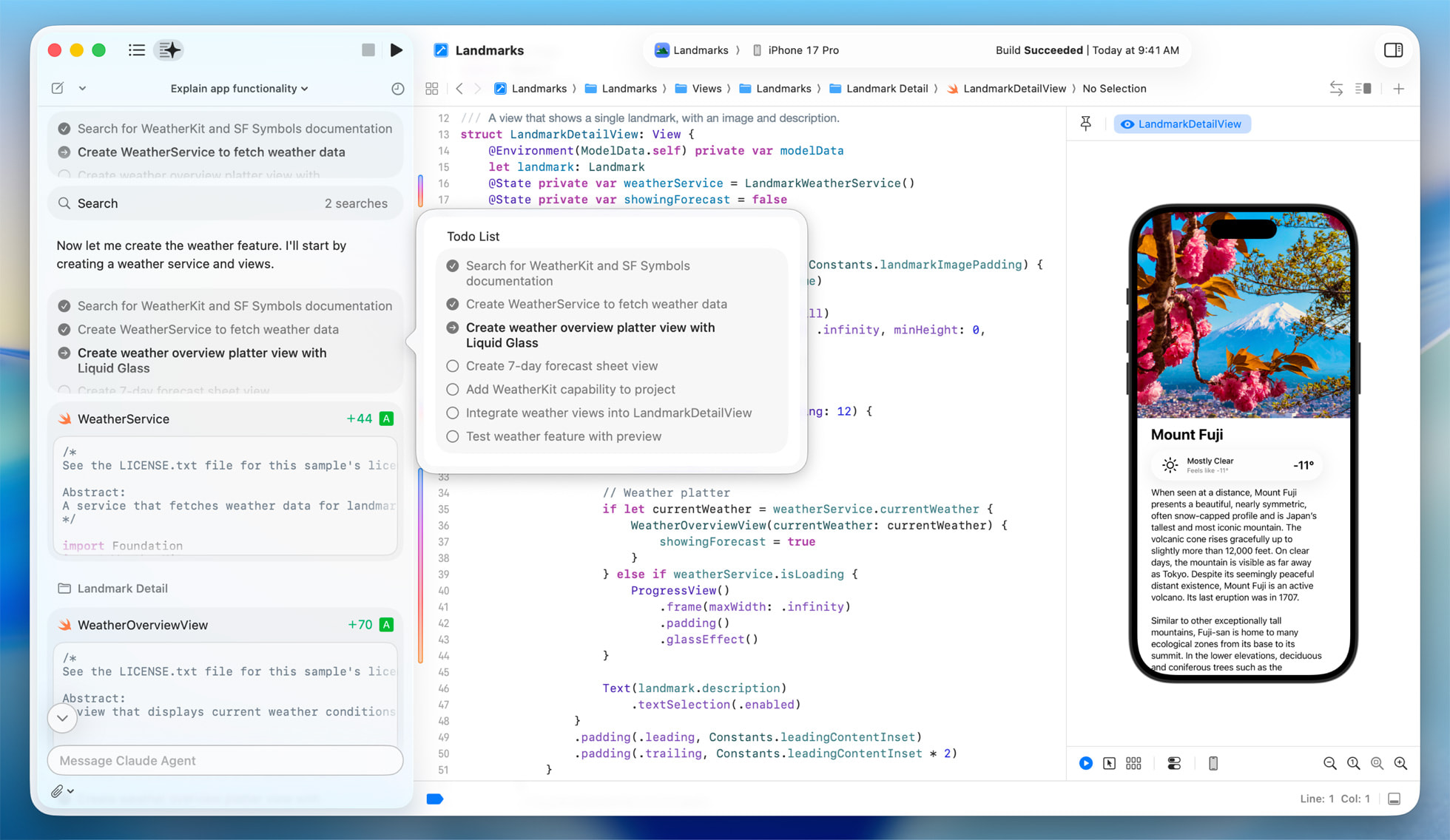
The best way to think about agentic tooling in Xcode is this: it turns “creating apps” into a loop of plan, change, verify, and revert. That loop is only valuable if your backend contract, state persistence, and cost controls are already in place.
If you treat your IDE agent like a collaborator, you will ship faster. If you treat it like an autopilot, you will spend your time undoing surprises.
When you want to move from an AI-generated UI to a shippable backend without DevOps, you can explore SashiDo - Backend for Modern Builders and start a 10-day free trial. If pricing matters for your runway, always verify the current numbers on our SashiDo pricing page before you commit.
Sources and Further Reading
- Apple Developer: Swift Assist . Useful for understanding Apple’s direction for intelligence inside Xcode.
- Apple Developer: Writing Code With Intelligence in Xcode . A practical overview of how Xcode surfaces intelligent assistance.
- Apple Newsroom: Apple Supercharges Its Tools and Technologies for Developers . Context on how Apple frames AI features across the toolchain.
- Model Context Protocol: Latest Specification . The core concept behind tool access and structured context.
- OpenAI Codex . A reference point for what “agentic coding” looks like as a product.
FAQs
What Does MCP Change for Agentic Coding in an IDE?
MCP standardizes how a model talks to tools and reads context, so the agent can act on structured inputs instead of guessing from partial UI state. In practice, it makes agent behavior more predictable and auditable.
How Do I Make Agent Work Resumable Across Runs?
Break tasks into checkpoints with explicit “stop and summarize” steps, and keep a written backend contract so the agent does not reinvent schemas. Persist app state and queued actions so the product itself can resume, not just the agent session.
When Should I Prefer Hand-Coding Over Agentic Code Fixes?
Prefer hand-coding when a change touches auth, authorization, sensitive data access, or complex concurrency, especially if you lack strong tests. Agents are best used there for small diffs and focused edits you can review.
Can I Build Agent-Supporting Backend Endpoints Without Heavy DevOps?
Yes, as long as you keep a clean separation between device code and server-side workflows. The key is to put secrets, long-running tasks, and rate limiting on the server, then call those endpoints from the app.
How Can SashiDo Help Me Ship a Prototype Faster?
We reduce the time spent wiring the backend basics by bundling database APIs, user management, file storage, serverless functions, realtime, jobs, and push into one deployable app backend. That lets you focus your agent iterations on product behavior instead of infrastructure.
